 Knowledge Base
Membership benefits and booking rules
Build reservation discounts, member pricing, grants, booking windows, and reservation restrictions, and understand how combined rules are resolved.
Membership benefits are available while the member is active and not paused. Most benefits apply automatically: the member does not need to select the membership during checkout.
Build benefits around a clear customer promise. A smaller set of understandable benefits is usually easier to sell and support than several overlapping price and booking rules.
Reservation discount
Apply either a percentage discount or a fixed amount to eligible reservations. Every restriction is optional, including:
- sports and resources;
- weekdays and times of day;
- date ranges;
- reservation durations and types;
- minimum payer count;
- assumed payer count for split payments.
Off-peak example
Discount: 25%
Days: Monday-Friday
Time: 08:00-14:00
Sports: selected racket sports
This rewards members and directs demand toward quieter hours without reducing peak prices.
Split-share example
Assume a four-player reservation costs €40 and the configured assumed payer count is 4. The member's assumed share is €10. A 20% membership discount reduces that share by €2; it does not reduce the entire reservation by 20%.
The minimum payer count defines how many other payers are required in addition to the booker. A value of 3 therefore requires the booker and three other payers.
Reservation custom pricing
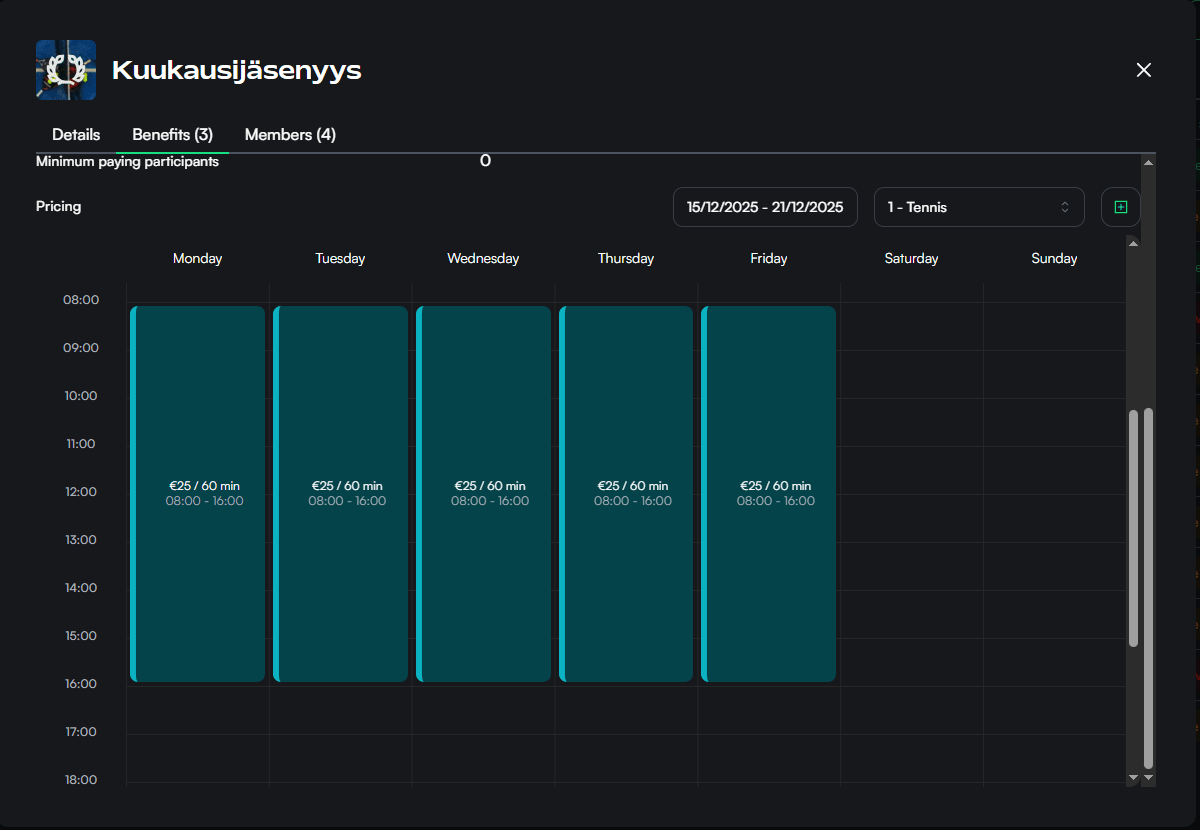
Custom pricing gives members their own reservation rates instead of calculating a discount from the normal rate. Add the custom-pricing benefit, then configure its court-pricing rules from the membership's benefits view.
Use custom pricing when the promise is a known rate such as “members pay €15 for 60 minutes.” Use a reservation discount when the member price should move with the venue's normal price.
Only one custom-pricing benefit can be configured for a membership in the portal. When applicable, custom pricing replaces normal reservation pricing rather than stacking with it.
Credits and session cards
A membership can grant:
- a positive number of credits; or
- a selected session-card product.
For recurring memberships, choose whether the grant happens only when the membership starts or repeats after each successful renewal.
Example:
Membership renews every 30 days
Recurring benefit: 50 credits
The first grant is issued when the member is created. Later grants are issued after successful renewals. A skipped renewal does not issue the recurring benefit, and a grant missed during a pause is not added afterward.
Previously issued credits and session cards remain separate products. A membership pause does not automatically disable balances or cards already granted.
See Credits and Session cards for their own validity and usage rules.
Booking window benefits
Early reservation
Let members reserve a configured number of days earlier than the normal venue window. If several active memberships provide early booking, the largest applicable early-booking allowance wins.
Reservation window restriction
Set a membership-specific reservation window. This rule takes precedence over early-reservation benefits, including early booking from another membership.
Use a restriction when the membership should have a specific planning horizon. Do not combine it with an early-reservation benefit expecting the two values to be added.
Reservation restrictions
A membership carries a list of reservation restrictions. Each one has its own scope, its own limits, and its own answer to what happens when a member reaches it.
Scope
A restriction can cover every reservation, or only part of the week: weekdays, times of day, sports, or individual resources. Anything you leave open matches everything.
A reservation that only touches the scope is inside it. With evening hours of 16:00–21:00, a 15:30–17:00 reservation counts as an evening reservation, so fifteen minutes of inconvenience cannot buy a member an extra evening slot.
Limits
Each restriction can set any of:
- Maximum upcoming reservations — how many the member can have waiting ahead of them. A reservation stops counting once its time has passed.
- Maximum reservations per period — how many they can make per day, week, month, or billing period. Reservations that have already been played still count, so the allowance does not refill during the period.
- Maximum booked time per period — the same, measured in hours instead of reservations.
- Maximum overlapping reservations — how many of the member's reservations may run at the same moment. Setting it to one stops them booking several resources for one group.
Cancelling a reservation frees its allowance again. A reservation listed for sale keeps using it, so selling one does not free capacity for a new booking. A membership whose benefits are paused stops restricting anything while the pause lasts.
Block, or charge the standard price
Every restriction chooses one of two things to do when a member reaches it.
- Block the reservation refuses it. This is what the earlier membership booking limits did, and existing memberships were migrated to it.
- Charge the standard price lets the member book anyway and charges the venue's normal price for that reservation, keeping the membership's price for everything inside the limit. The calendar, the price preview and checkout all show the same price, so the member sees it before booking rather than on the receipt.
Choose standard price when the limit exists to stop a membership being used as unlimited cheap capacity, and blocking when the limit exists to protect the schedule itself.
How restrictions combine
A member holding several memberships gets the most generous treatment any one of them gives a booking: if one membership's allowance is spent and another still has room, the reservation is included. A restriction set to block is the exception — it applies whatever else the member holds, so a second membership cannot make them immune to it.
A membership with no restrictions restricts nothing, which is why a member holding one unrestricted membership is unrestricted.
Where two memberships block on the same limit, the more generous of them decides: one allowing 5 upcoming reservations and one allowing 2 gives the member 5. Only the same limit counts. A membership that limits something else — overlapping reservations, or reservations per week — says nothing about how many the member may have waiting ahead of them, so it cannot lift the other membership's limit on that. Neither can a membership that sets no restriction at all.
The venue's own limit
The venue's maximum simultaneous future reservations per user in reservation settings applies to everyone. A membership restriction that blocks and limits upcoming reservations replaces that number for its members, so a venue allowing 3 with a membership allowing 5 gives non-members 3 and those members 5. A restriction set to standard price does not replace it: a limit that refuses nothing cannot stand in for a hard one, so the venue's number keeps applying underneath.
Outside a restriction's scope the venue's number applies too, so an evenings-only restriction of 5 does not uncap the mornings.
Reservations made by staff
A reservation staff make for a member is never refused by a membership restriction, and neither is a recurring reservation the venue runs for them. Both still use the member's allowance and are priced accordingly. The member's remaining allowance is shown in the member's details in the members list, so an employee can see what is left before booking.
Prime-time example
Restriction: Prime time
Applies to:  Mon–Fri 16:00–21:00, tennis and padel
Limits:      6 reservations per billing period, 2 upcoming reservations
Exceeding:   charge standard price
Members book prime time freely until the sixth reservation of their billing period, after which prime time is still bookable at the venue's normal price. Mornings and weekends are untouched, because they fall outside the restriction's scope.
If a time is sold only to members — a member-only pricing rule with no public price underneath it — a member whose allowance is spent cannot book that time at all, because there is no standard price to charge. Give member-only windows a public price as well if you want them bookable past the allowance.
Discounts on other products
Membership holders can receive discounts on products such as events, tournaments, courses, session cards, or Pro Shop items when that product is configured to recognize the membership.
This is configured on the product being purchased, not as a grant inside the membership. Keep the product's own guide and sales terms authoritative for what is discounted.
When several prices are available
Reservation prices and membership billing prices are separate systems.
- Reservation custom pricing determines the member's eligible booking rate.
- Reservation discounts compete with other eligible booking discounts; checkout applies one discount rather than stacking several.
- Trial, introductory, and Goodwill pricing affect the membership's own purchase or renewal charges.
- Applicable purchase discounts affect the initial membership checkout, not reservations or later renewals.
When diagnosing a price, first identify which transaction is being priced: the membership purchase, a recurring renewal, or a reservation.
Pauses, expiry, and access
Membership-derived benefits are unavailable while the member is paused or outside their active validity. A pause also removes membership-based physical access while active.
An unpaid renewal that restricts reservations can also remove membership-based physical access. Do not assume it removes previously issued credits or every unrelated entitlement; inspect the member, payment, and relevant product separately.
Benefit design checklist
- Test at least one eligible and one ineligible reservation time.
- Test split-payment assumptions when payer counts affect the benefit.
- Check how booking-window rules interact with other memberships.
- Decide whether credits or session cards should repeat on renewal.
- Confirm each restriction's scope, limits, and block-or-price choice against realistic customer behavior.
- Keep customer-facing descriptions specific enough to explain material restrictions.
For benefits shared by partner venues, continue to Membership reach and external memberships. For doors and gates, see Membership access integrations.
Create and configure a membership
Configure membership details, billing, visibility, reach, benefits, integrations, and launch settings without changing existing member terms unexpectedly.
Membership billing, contracts, and renewals
Understand initial payments, recurring periods, fixed and notice-period agreements, member price snapshots, renewal grants, and failed-payment behavior.